
User Management
The work on user management is at a very early stage. Many organisations may already have a directory of users and may be able to reuse this with some software inbetween.
The goal of EU OS is to develop a strategy that provides for gradual migration from Windows computers to Linux computers. For this, user management must support a hybrid setup with both Windows and EU OS computers at the same time.
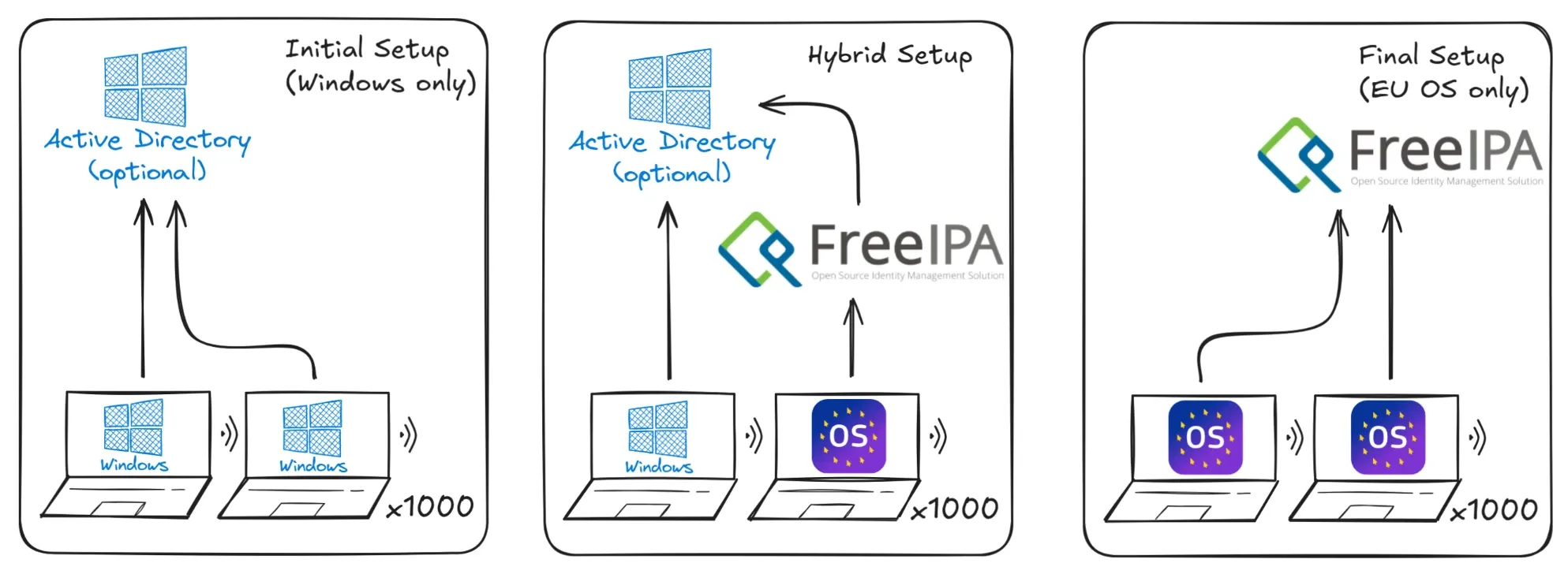
References:
- sssd.io
- FreeIPA
- Joining an Active Directory or FreeIPA domain
- https://github.com/siemens/linux-entra-sso. Browser plugin for Linux to SSO on Microsoft Entra ID using a locally running microsoft identity broker (Intune).
Setup FreeIPA VM
This section assumes that the server has been prepared already with an empty AlmaLinux VM.
FreeIPA has to be setup first, because its root CA will provide the certificates for all hosts, including the one for Foreman. While changing Foreman server certificates after initial setup is possible, best is to avoid it and just setup FreeIPA first, so that it can generate the certificates for Foreman before.
sudo hostnamectl hostname users.eu-os.internal
sudo timedatectl set-timezone Europe/Brussels

# check time settings
timedatectl

echo "192.168.122.112 users.eu-os.internal ipa users" | sudo tee -a /etc/hosts

sudo dnf -y update
sudo dnf -y install freeipa-server freeipa-server-dns freeipa-client

# if firewall-cmd is installed and firewalld running:
sudo firewall-cmd --permanent --add-service={dns,ntp,freeipa-4}
sudo firewall-cmd --reload
# verify settings
sudo firewall-cmd --list-all

sudo ipa-server-install \
  --realm EU-OS.INTERNAL \
  --ds-password "<DM_Password>" \
  --admin-password "<admin_password>" \
  --unattended
# for interactive-install, use: sudo ipa-server-install

# check install
sudo ipactl status

# test login
kinit admin
ipa pwpolicy-show
ipa pwpolicy-mod --minlength=4
ipa user-add john.doe --first=John --last=Doe --cn="John Doe"
ipa passwd john.doe
ipa user-show john.doe

# list all users
ipa user-find

# find FreeIPA web GUI: https://users.eu-os.internal
Once Foreman is setup, Foreman will create hosts in FreeIPA automatically. However, system administrators must create the user accounts in FreeIPA manually.
References:
- https://green.cloud/docs/how-to-install-freeipa-server-on-almalinux-9/
- https://www.dotlinux.net/blog/how-to-install-and-configure-freeipa-on-red-hat-linux/
Create Users
System administrators can create users via the web interface or via any host that is enrolled to FreeIPA (e.g. the Foreman VM). Consider the following example:
kinit admin # login as admin
klist # confirm current login sessions

# testing with easy passwords ;)
ipa pwpolicy-mod --minlength=4
ipa pwpolicy-show

# test user with name Alex Xela
ipa user-add alex.xela --first=Alex --last=Xela --cn="Alex Xela"
ipa passwd alex.xela
ipa user-show alex.xela
# test host-based access control
ipa hbactest --user=alex.xela --host=mac9c2dcdc96b85.eu-os.internal

# test on eu os workstation (possibly with root account):
kinit alex.xela # requires to change password first time, then run again
klist
id alex.xela
getent passwd alex.xela
FreeIPA is a powerful tool that allows to define policies per user-groups and per host-groups.
ipa hostgroup-add --desc="Workstations with EU OS" workstations-eu-os
ipa hostgroup-add-member workstations-eu-os --hosts=mac9c2dcdc96b85.eu-os.internal

# to be developed
References:
- https://www.freeipa.org/page/Quick_Start_Guide
- https://bitbin.de/blog/2013/11/foreman-freeipa-integration-guide/ explains how Foreman machines are enrolled with FreeIPA, but ignores katello and mTLS certificates
- https://freeipa.readthedocs.io/en/latest/workshop/4-hbac.html#hbac on host-based access control
- https://sssd.io/docs/ipa/ipa-introduction.html on SSSD and FreeIPA
- https://sssd.io/docs/ipa/ipa-introduction.html on AD users on hosts in FreeIPA Realms
- https://sssd.io/troubleshooting/basics.html for sssd troubleshooting